The Psychological Implications of Color Themes on Your Website

When Designing a New Website

Color themes on websites strongly influence user emotions, trust, and engagement.

Each color carries psychological associations that shape how visitors perceive a brand, interact with content, and decide whether to stay or convert.

🎨 Key Psychological Implications of Website Colors

  • Blue – Trust & Calmness Often used by tech and finance companies, blue conveys stability, professionalism, and reliability. It reduces anxiety and encourages users to feel secure.
  • Green – Health & Growth Associated with nature, balance, and success, green is restful for the eyes and works well for eco-friendly or wellness brands.
  • Red – Excitement & Urgency Red stimulates energy, passion, and urgency. It’s effective for calls-to-action (CTAs), sales promotions, or warnings, but overuse can feel aggressive.
  • Orange – Friendliness & Enthusiasm Radiates warmth and creativity. Orange is often used for playful brands or CTAs that want to feel approachable.
  • Yellow – Optimism & Attention Bright and cheerful, yellow signals clarity and positivity, but can strain the eyes if overused. It’s often applied to highlights or warnings.
  • Purple – Luxury & Creativity Historically linked to royalty, purple conveys sophistication, mystery, and premium quality. It’s common in beauty, art, and luxury branding.
  • Pink – Playfulness & Romance Evokes youth, femininity, and fun. Frequently used in lifestyle, fashion, and beauty websites.
  • Black/Gray – Power & Sophistication Neutral tones suggest elegance, authority, and timelessness. They’re often used in luxury or minimalist designs.

🧠 Why Color Matters in Web Design

  • First Impressions: Visitors form opinions about a site in seconds, and color is a major driver of that impression.
  • Behavioral Influence: Even small changes, like button color, can dramatically increase conversions.
  • Brand Identity: Consistent use of color reinforces recognition and credibility.
  • Accessibility: High-contrast schemes improve readability and inclusivity for visually impaired users.
  • Cultural Context: Colors may carry different meanings across cultures (e.g., white = purity in the West, mourning in parts of Asia).

✅ Practical Tips for Using Color Themes

  1. Match colors to brand personality (e.g., blue for trust, green for eco-consciousness).
  2. Use warm colors (red, orange, yellow) for CTAs to grab attention.
  3. Balance with cool colors (blue, green) for backgrounds to reduce visual fatigue.
  4. Test variations—A/B testing button colors or themes can reveal what resonates with your audience.
  5. Ensure accessibility by checking contrast ratios and avoiding problematic combinations (like red/green for colorblind users).

In short: Website color themes aren’t just aesthetic—they’re psychological tools that shape perception, trust, and action. Thoughtful use of color can elevate user experience, strengthen brand identity, and boost conversions.


References

1Color Psychology in Website Design | New Target, Inc.. https://www.newtarget.com/web-insights-blog/color-psychology-in-website-design/

2Color Theory for Web Design – Color Schemes, Psychology & Accessibility …. https://design.dev/guides/color-theory/

3Exploring Color Psychology in Design | Toptal®. https://www.toptal.com/designers/ux/color-psychology

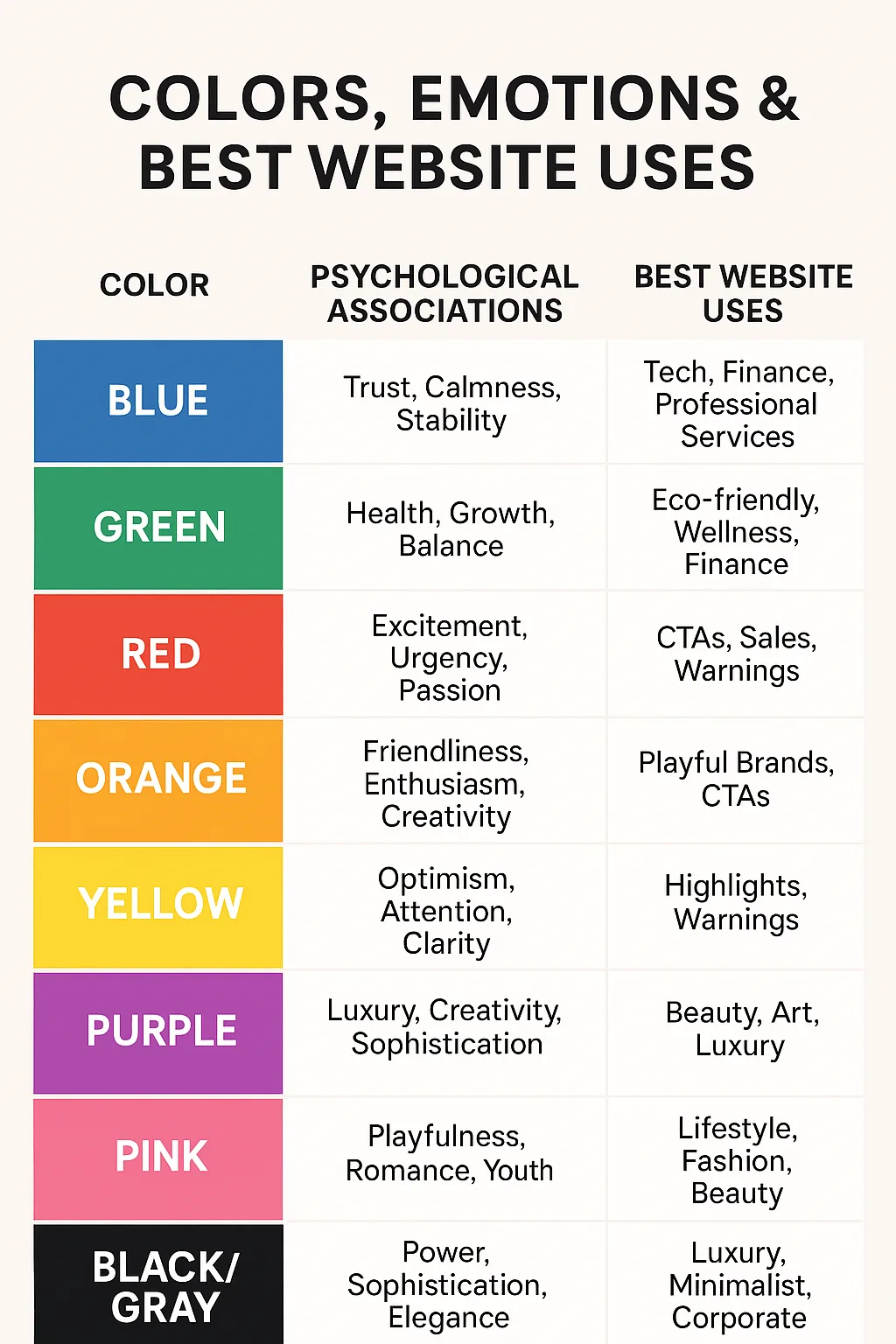
Visual Chart: Colors, Emotions & Best Website Uses

Color Psychological Associations Best Website Uses
Blue Trust, Calmness, Stability Tech, Finance, Professional Services
Green Health, Growth, Balance Eco-friendly, Wellness, Finance
Red Excitement, Urgency, Passion CTAs, Sales, Warnings
Orange Friendliness, Enthusiasm, Creativity Playful Brands, CTAs
Yellow Optimism, Attention, Clarity Highlights, Warnings
Purple Luxury, Creativity, Sophistication Beauty, Art, Luxury
Pink Playfulness, Romance, Youth Lifestyle, Fashion, Beauty
Black/Gray Power, Sophistication, Elegance Luxury, Minimalist, Corporate
AI Office developers working on office AI app development and implementation.

How I got more free visitors to my website

AI Office developers creating innovative office solutions and smart technologies.

How AI Can Help Your Website

Jim Carey is interviewed by Jason Schwartz on The Maui Neutral Zone, Akaku TV and radio. In this interview, Jim illustrates how and why optimizing websites works, and how it’s done.

Referenced Websites in the Interview:
https://MauiNeutralZone.com/
https://DreamMaui.com/
https://RochesterPMG.com/
https://DownriverPropertyManagement.com/
https://aiOffice.dev/

The linked page has a time-stamped transcript of the interview, and a summary.

A Beginner’s Guide to AI

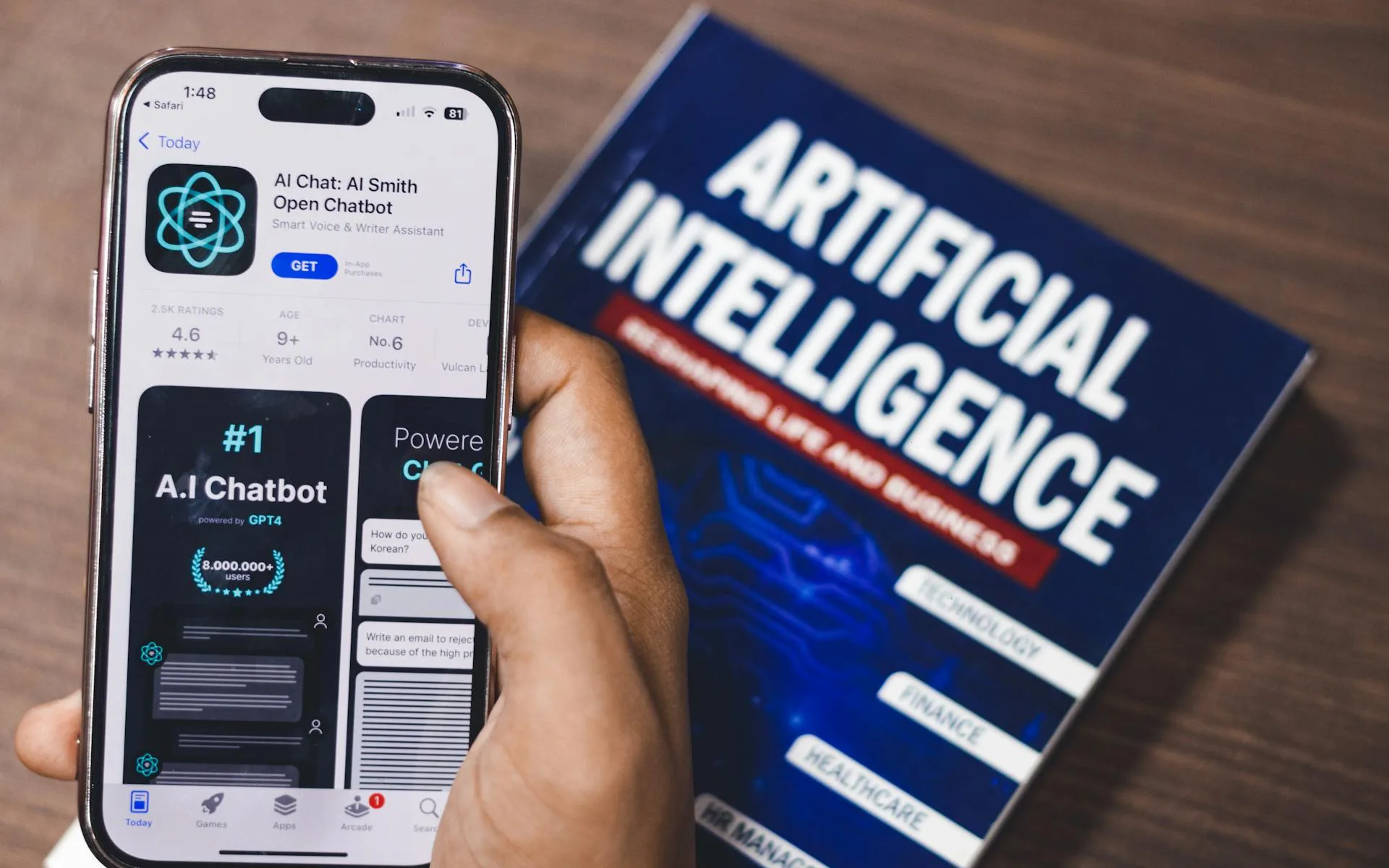
AI chatbot app on smartphone screen with a book about artificial intelligence in background.

🤖 Lead, Follow, or Get Left Behind

Artificial Intelligence (AI) can feel intimidating at first, but at its core, it’s simply a tool that helps you think, write, organize, and solve problems more efficiently. You don’t need to be technical, creative, or “good with computers” to use it.

This guide walks you through AI in plain language.

🔄 AI Is a Conversation, Not a Search Engine

The more specific you are, the better the result.
AI isn’t like Google. You don’t need perfect wording.
You can:

  • Ask follow‑up questions
  • Say “That’s not what I meant”
  • Ask it to rewrite or explain differently

Example:
“That sounds too formal. Can you make it more casual?”

🌱 What AI Actually Is (In Simple Terms)

AI is software that:

  • Reads and understands language
  • Recognizes patterns
  • Generates responses based on what it has learned
  • Technically, it’s an expert system, and not intelligent

Think of AI as:

Read more: A Beginner’s Guide to AI
  • A very fast assistant
  • A thinking partner
  • A drafting and brainstorming tool

It does not:

  • Think on its own
  • Have opinions or emotions
  • Know things unless you ask clearly

🧠 What AI Is Good At

AI works best when you want help with:

  • Writing emails, posts, or documents
  • Brainstorming ideas
  • Summarizing information
  • Organizing thoughts
  • Learning new topics
  • Rewriting or improving text
  • Planning projects or tasks

It’s especially useful when you’re:

  • Staring at a blank page
  • Unsure how to phrase something
  • Overwhelmed by information

🚫 What AI Is Not Good At

AI is not:

  • A replacement for human judgment
  • Always correct
  • A source of guaranteed facts
  • A mind reader

You should always:

  • Review what it gives you
  • Adjust it to sound like you
  • Double‑check important details

🧩 How to Think About Using AI

The most important thing to understand is this:
AI responds to how you ask, not just what you ask.

AI works best when you:

  • Explain what you want
  • Provide context
  • Describe the outcome you’re aiming for

Instead of short commands, think in full thoughts.

✍️ How to Ask AI Good Questions

❌ Weak Prompt

“Write an email.”

✅ Better Prompt

“Write a friendly email to a client explaining a small delay and reassuring them everything is on track.”

🛠️ A Simple Way to Start Using AI

Here’s a beginner‑friendly process:

  1. Decide what you want help with
    • Writing
    • Planning
    • Learning
    • Organizing
  2. Explain your situation
    • Who it’s for
    • What tone you want
    • What the goal is
  3. Review the response
    • Keep what works
    • Change what doesn’t
  4. Refine
    • Ask for revisions
    • Ask “why” if something surprises you

🎯 Examples of Beginner AI Uses

  • “Help me write a professional but friendly email.”
  • “Summarize this article in plain English.”
  • “Give me ideas for a presentation.”
  • “Rewrite this paragraph to sound clearer.”
  • “Explain this topic like I’m new to it.”

🧠 A Helpful Mindset

AI works best when you treat it as:

  • A drafting partner, not a final authority
  • A thinking aid, not a decision maker
  • A starting point, not the finish line

You stay in control.

🌈 Final Thought

You don’t need to “learn AI” before using it.
The best way to understand AI is simply to:

  • Try it
  • Talk to it
  • Adjust your requests
  • Learn by doing

AI is most powerful when it helps you think more clearly — not when it tries to think for you.

Here’s a link to my Library of 4,000 AI Articles
– I’m always reading and learning more –
AI & Expert Systems | @drjimcarey | Flipboard

Prepare Your Website for AI Search

Screenshot of coding and software development on multiple screens with a focus on AI and automation.

How AI Can Help Your Website

Jim Carey is interviewed on Maui Akaku TV and radio, describing how and why websites need to be edited for AI search.

To view this video with a time-stamped transcript and summary, click on the button below:

View Jim's Interview on Maui Neutral Zone

EZ Share Link to the video: https://bit.ly/carey-ai2

  • I look a lot younger in the mirror than I do on TV. <<laughing>>

Your Website Isn’t the Problem — The System Behind It Is Costing You Leads

AI Office Developers offers tailored website development and marketing strategies to boost your online presence.

A website that “looks fine” but no longer generates leads is one of the most frustrating problems a small business owner can face.

Traffic is still coming in. The design still feels modern. But inquiries have slowed down, forms have gone quiet, and sales are flat.

The danger isn’t that the site is broken — it’s that it’s quietly failing to convert the people already visiting. That silent failure can cost you customers, every day, without any obvious warning signs.

This is exactly where aioffice.dev helps.

Most small and medium businesses don’t need a full redesign or another marketing experiment. They need clarity. At AI Office Developers, the focus is on understanding how your website actually functions as a business system, not just how it looks. That means examining how visitors arrive, what they see first, where they hesitate, and why they leave without taking action.

A common issue is misalignment. Your website may be attracting the right audience, but the messaging doesn’t speak directly to their problem. Calls to action are often vague, buried, or disconnected from what visitors are ready to do. aioffice.dev identifies these friction points and restructures the site so that each page guides visitors toward a clear next step: requesting a quote, booking a call, or starting a conversation.

AI Office developers focused on SEO, AI tools, and innovative technology solutions.

Another hidden problem is outdated assumptions. Many websites were built years ago around old search behavior, old devices, and old expectations. aioffice.dev modernizes the underlying structure using current SEO, analytics, and AI‑assisted insights to understand how real users behave today.

This allows your site to respond to intent rather than guesswork.

For businesses without a dedicated tech person, this approach removes uncertainty. Instead of juggling plugins, vendors, and half‑working tools, aioffice.dev acts as a strategic partner who understands the entire system – website, search visibility, automation, and lead flow.

The goal isn’t more complexity. It’s fewer moving parts that work together reliably.

Most important, aioffice.dev helps turn your website back into a revenue‑producing asset. By improving clarity, trust, and conversion paths, the site stops leaking opportunities and starts supporting growth again. You don’t need more traffic to fix a silent failure. You need a system that converts the attention you already have.

Your website isn’t broken. It just needs to work harder for your business — and aioffice.dev is built to make that happen.

Three Case Studies
 
Contact Us